本文档基于 OpenClaw 官方文档 及 GitHub 源码梳理,详细说明 OpenClaw 如何为每次 Agent 运行构建完整的 Prompt。
文档版本:2026-05-06 官方文档:https://docs.openclaw.ai GitHub:https://github.com/openclaw/openclaw
一、核心设计原则
OpenClaw 的 Prompt 构建遵循以下核心原则:
- OpenClaw 完全拥有 Prompt 的组装权:不使用 pi-coding-agent 等运行时默认 Prompt,Prompt 由 OpenClaw 全权构建并注入每次 Agent 运行。
- Provider 插件只能贡献缓存感知的引导性内容,不能替换完整的 OpenClaw-owned Prompt。
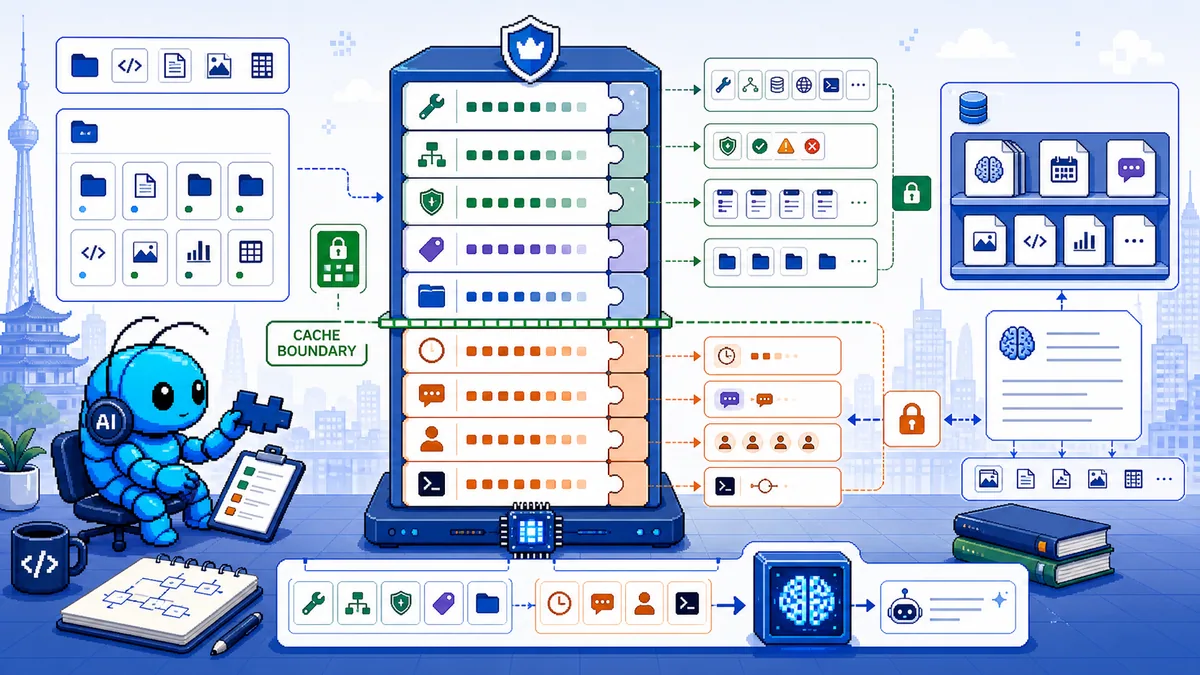
- Prompt 按稳定性分层:大段稳定内容(如 Project Context)放在内部 Prompt 缓存边界之上;易变的通道/会话内容(如 Runtime、Messaging)放在缓存边界之下,以支持本地后端的前缀缓存复用。
- Skills 按需加载:Skill 列表(名称 + 描述 + 路径)会注入 System Prompt,但 Skill 指令本身不默认注入,由模型在需要时自行读取
SKILL.md。 - 内存与上下文分离:内存(MEMORY.md、memory/*.md)存储在磁盘上,需显式读取才进入上下文窗口;上下文(Context)是当前模型窗口内的所有内容。
二、完整 Prompt 结构
OpenClaw 的 System Prompt 由以下固定 sections 组成:
2.1 各 Section 详解
| Section | 说明 | 稳定性 |
|---|---|---|
| Tooling | 结构化工具来源提醒 + 运行时工具使用指导 | 稳定 |
| Execution Bias | 紧凑的行动指导:立即行动、持续到完成、从弱结果中恢复、检查可变状态、验证后再完成 | 稳定 |
| Safety | 简短的安全护栏提醒(避免 power-seeking 或绕过监督) | 稳定 |
| Skills | 可用 Skill 的名称、描述、路径列表(模型需时读取) | 稳定 |
| OpenClaw Self-Update | 如何用 config.schema.lookup、config.patch、config.apply 安全检查配置;如何用 update.run;gateway 工具拒绝重写 tools.exec.ask/tools.exec.security |
稳定 |
| Workspace | 工作目录(agents.defaults.workspace) |
稳定 |
| Documentation | 本地文档路径或 https://docs.openclaw.ai;GitHub 源码位置;openclaw status 自检说明 |
稳定 |
| Workspace Files(Project Context) | 引导文件注入区域(见 3.3 节) | 稳定 |
| Sandbox(启用时) | 沙箱运行时、沙箱路径、elevated exec 是否可用 | 稳定 |
| Current Date & Time | 仅时区(无动态时钟,以保持缓存稳定) | 稳定 |
| Reply Tags | 支持的回复标签语法(可选) | 稳定 |
| Heartbeats | 心跳轮询行为和 ack 规则(默认 Agent 启用心跳时) | 稳定 |
| Runtime | host、OS、node、model、repo root(检测到时)、thinking 级别(一行) | 变化 |
| Reasoning | 当前可见性级别 + /reasoning 切换提示 |
变化 |
| Messaging | 消息通道相关内容(below cache boundary) | 变化 |
| Group Chat Context | 群聊上下文(below cache boundary) | 变化 |
| Heartbeats(运行时区块) | 心跳运行时区块(below cache boundary) | 变化 |
缓存边界(Prompt Cache Boundary):OpenClaw 将大段稳定内容放在缓存边界之上,将易变的通道/会话 section 放在边界之下,这样本地后端(如有前缀缓存)可以跨通道轮次复用稳定的 workspace 前缀。
2.2 Tooling Section 额外指导
Tooling section 还包含长时间运行的工具使用规范:
- 使用 cron 做未来跟进(
check back later、提醒、循环工作),而非exec睡眠循环或反复process轮询 - 使用
exec/process仅用于"现在开始、持续运行"的命令 - 自动完成唤醒启用时,启动一次命令并依赖推送式唤醒路径
- 大任务优先使用
sessions_spawn;子 Agent 完成是推送式的 - 不要轮询
subagents list/sessions_list等待完成
三、组装流程详解
3.1 入口点
| 入口方式 | 说明 |
|---|---|
Gateway RPC agent / agent.wait |
主要入口 |
CLI agent 命令 |
命令行调用 |
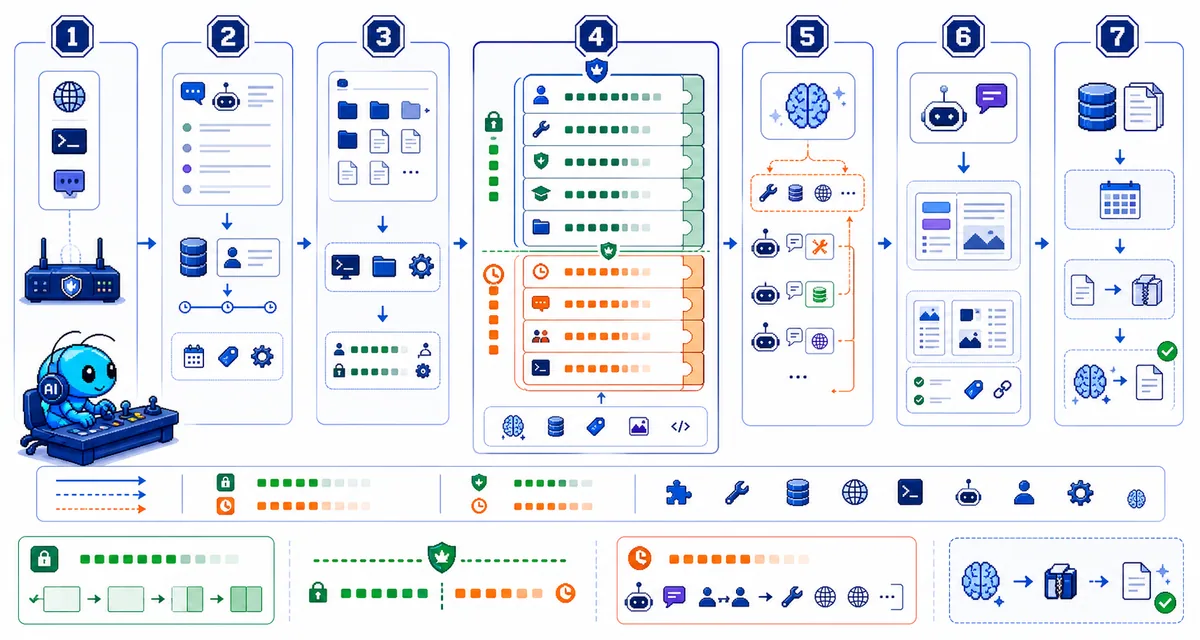
3.2 完整组装步骤
用户消息
    │
    ▼
┌─────────────────────────────────────────────────────────────┐
│ 1. Session 解析 + 元数据持久化                              │
│    - 验证参数,解析 session(sessionKey/sessionId)           │
│    - 持久化 session 元数据,返回 { runId, acceptedAt }       │
└─────────────────────────────────────────────────────────────┘
    │
    ▼
┌─────────────────────────────────────────────────────────────┐
│ 2. Session + Workspace 准备                                 │
│    - 解析并创建 workspace(如需要)                          │
│    - 沙箱运行时可能重定向 workspace root                     │
│    - 加载 Skills 快照(注入 env 和 prompt)                  │
│    - 解析引导/上下文文件并注入 system prompt                  │
│    - 获取 session 写锁;打开 SessionManager                   │
└─────────────────────────────────────────────────────────────┘
    │
    ▼
┌─────────────────────────────────────────────────────────────┐
│ 3. Prompt 组装(核心)                                       │
│    - 构建 OpenClaw base prompt(含所有固定 sections)        │
│    - 注入 Skills list(formatSkillsForPrompt)              │
│    - 注入 Bootstrap Context Files(Project Context)        │
│    - 应用 per-run overrides                                  │
│    - Provider 插件可替换/注入部分 sections                   │
│    - 模型特定限制和 compaction 预留 token 生效               │
└─────────────────────────────────────────────────────────────┘
    │
    ▼
┌─────────────────────────────────────────────────────────────┐
│ 4. Model Inference                                           │
│    - 调用 runEmbeddedPiAgent(pi-agent-core 运行时)         │
│    - 订阅 pi 事件,流式推送 assistant/tool deltas           │
│    - 执行工具,收集结果                                      │
│    - lifecycle end/error 由 subscribeEmbeddedPiSession 发射  │
└─────────────────────────────────────────────────────────────┘
    │
    ▼
┌─────────────────────────────────────────────────────────────┐
│ 5. 回复组装(Reply Shaping)                                │
│    - 汇总 assistant text(+ reasoning)                      │
│    - 附加工具摘要(verbose + allowed 时)                     │
│    - assistant error text(模型错误时)                       │
│    - 过滤 NO_REPLY / no_reply                               │
│    - 移除重复的 messaging tool                              │
│    - 无渲染内容 + 工具错误 → 发送 fallback 错误回复          │
└─────────────────────────────────────────────────────────────┘
    │
    ▼
┌─────────────────────────────────────────────────────────────┐
│ 6. 持久化 + Compaction                                       │
│    - 写会话 transcript(受 session 写锁保护)                │
│    - 自动 compaction 触发 → 压缩旧历史                       │
│    - 自动 memory flush(silently) → 提醒 agent 保存重要上下文│
└─────────────────────────────────────────────────────────────┘
四、系统提示词(System Prompt)构建细节
4.1 基础构成
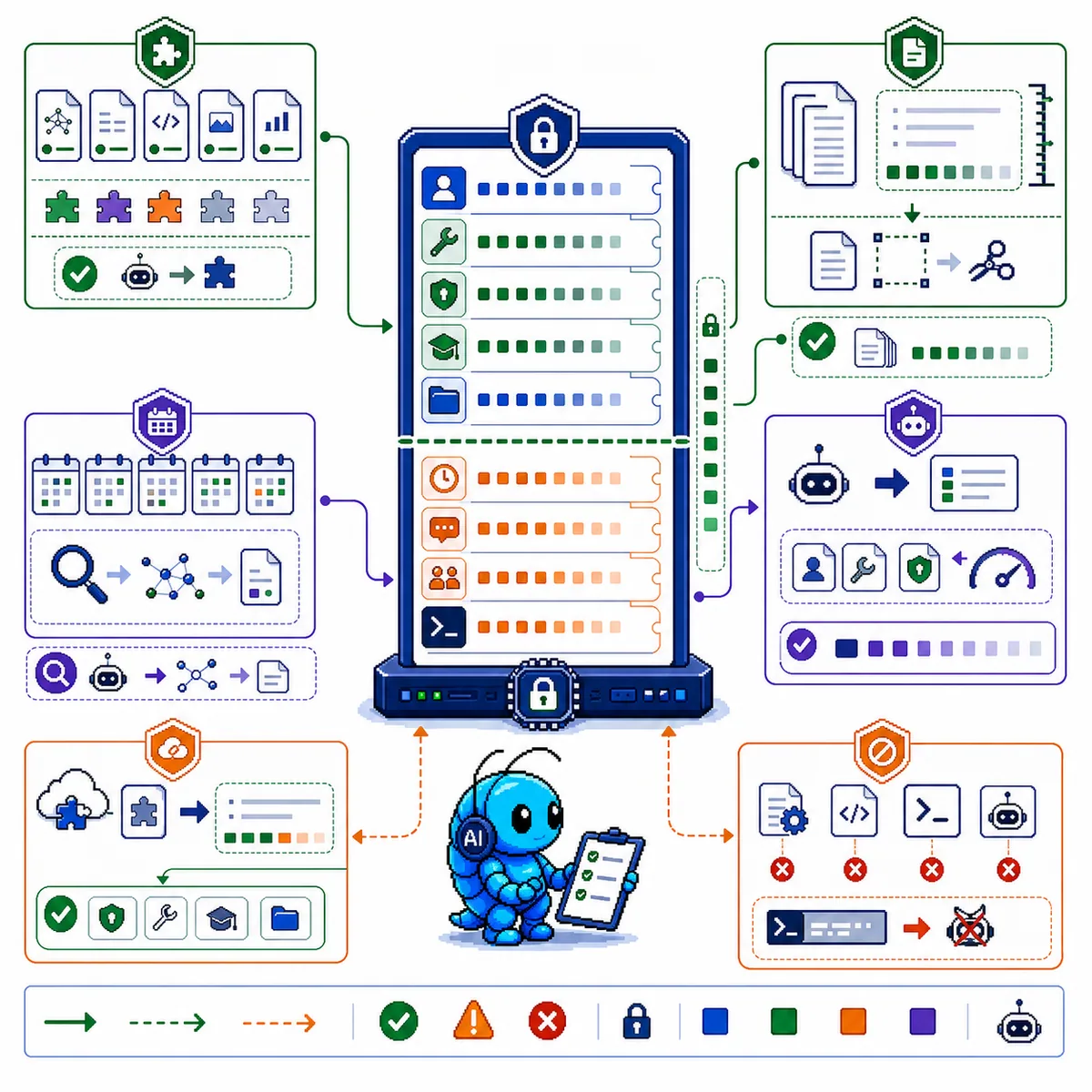
System Prompt 由以下层次叠加而成:
┌──────────────────────────────────────────────┐
│ 1. OpenClaw Base Prompt(固定 sections 集)    │
│    - Tooling                                 │
│    - Execution Bias                          │
│    - Safety                                  │
│    - (Skills,见 4.2)                       │
│    - OpenClaw Self-Update                    │
│    - Workspace                               │
│    - Documentation                           │
│    - Current Date & Time(仅时区)            │
│    - Reply Tags(可选)                       │
│    - Heartbeats(启用时)                     │
│    - Runtime                                 │
│    - Reasoning                               │
├──────────────────────────────────────────────┤
│ 2. Skills List(可用时)                     │
│    <available_skills>                        │
│    <skill><name>...</name><description>...  │
│    <location>...</location></skill>          │
│    </available_skills>                       │
├──────────────────────────────────────────────┤
│ 3. Project Context(Bootstrap Files)        │
│    - Workspace Files 注入区域                 │
│    - 大文件自动截断(见 4.3)                 │
├──────────────────────────────────────────────┤
│ 4. Dynamic Sections(below cache boundary)  │
│    - Sandbox(启用时)                        │
│    - Messaging                               │
│    - Group Chat Context                      │
│    - Heartbeats runtime                      │
│    - Runtime(变化部分)                      │
├──────────────────────────────────────────────┤
│ 5. Provider Hooks 贡献                       │
│    - 可替换:interaction_style, tool_call_style, │
│      execution_bias                          │
│    - 缓存稳定前缀(above boundary)           │
│    - 动态后缀(below boundary)               │
└──────────────────────────────────────────────┘
4.2 Skills 处理
Skills 不默认将指令全文注入 Prompt。处理方式:
可用 Skills 元数据列表
(name + description + location)
        │
        ▼
注入 System Prompt 的 <available_skills> 区块
        │
        ▼
模型在需要时自行用 read 工具读取 SKILL.md
Skills 列表注入示例格式:
<available_skills>
  <skill>
    <name>stock-analysis</name>
    <description>A股股票深度分析技能...</description>
    <location>~/.openclaw/workspace/skills/stock-analysis/SKILL.md</location>
  </skill>
  ...
</available_skills>
Eligibility 检查:
- Skill metadata gates(metadata.openclaw)
- 运行时环境/config 检查
- Agent skill allowlist(agents.defaults.skills 或 agents.list[].skills)
- Plugin-bundled skills 仅在插件启用时有效
预算控制:
- 全局默认:skills.limits.maxSkillsPromptChars
- Per-agent 覆盖:agents.list[].skillsLimits.maxSkillsPromptChars
- 与运行时读取/注入的大小控制(memory_get、工具结果、compaction 后 AGENTS.md 刷新)分开
4.3 Bootstrap Files(Project Context)注入
OpenClaw 在每次运行时会将以下文件(如果存在)注入到 Project Context 区域:
| 文件 | 说明 | 注入条件 |
|---|---|---|
AGENTS.md |
工作空间说明、每次对话开始时必读 | 始终 |
SOUL.md |
身份、人格、边界定义 | 始终 |
TOOLS.md |
本地环境笔记、授权级别 | 始终 |
IDENTITY.md |
身份标识、保密准则 | 始终 |
USER.md |
用户信息、数字资产索引 | 始终 |
HEARTBEAT.md |
心跳处理清单 | 启用心跳时 |
BOOTSTRAP.md |
首次运行引导 | 仅全新 workspace |
MEMORY.md |
长期记忆 | 存在时 |
memory/*.md(每日笔记)不参与正常引导注入。在普通轮次中通过memory_search/memory_get按需访问,不占用上下文窗口(除非模型显式读取)。/new和/reset除外:运行时可以 prepend 最近每日内存作为首发上下文块。
截断机制:
| 参数 | 默认值 | 说明 |
|---|---|---|
agents.defaults.bootstrapMaxChars |
12,000 | 单文件最大字符数 |
agents.defaults.bootstrapTotalMaxChars |
60,000 | 所有注入文件总上限 |
agents.defaults.bootstrapPromptTruncationWarning |
once |
截断时是否警告(off/once/always) |
Sub-agent 差异:
- Sub-agent session 仅注入 AGENTS.md 和 TOOLS.md(其他引导文件过滤掉以保持 sub-agent 上下文小)
Hook 拦截:
- agent:bootstrap hook 可以在最终确定 system prompt 之前拦截并修改/替换注入的引导文件
4.4 Prompt 模式(Prompt Modes)
OpenClaw 为 sub-agent 渲染更小的 system prompt,由运行时设置 promptMode(非用户可见配置):
| 模式 | 说明 |
|---|---|
full(默认) |
包含所有 sections |
minimal |
用于 sub-agent;省略 Skills、Memory Recall、OpenClaw Self-Update、Model Aliases、User Identity、Reply Tags、Messaging、Silent Replies、Heartbeats。保留 Tooling、Safety、Workspace、Sandbox、Current Date & Time(已知时)、Runtime、注入上下文。 |
none |
仅返回 base identity 行 |
五、用户提示词(User Prompt)构建
5.1 用户消息处理
用户消息进入 Prompt 前经过以下处理:
用户输入(消息文本)
    │
    ▼
┌──────────────────────────────────────────────┐
│ 1. 解析消息 envelope                         │
│    - 提取 chat_id, account_id, channel 等元数据 │
│    - 提取引用的消息、群组信息等                 │
└──────────────────────────────────────────────┘
    │
    ▼
┌──────────────────────────────────────────────┐
│ 2. 指令/directive 处理                         │
│    - 独立指令:消息仅为 /... 时作为命令执行     │
│    - Directives:/think, /verbose, /trace,    │
│      /reasoning, /elevated, /model, /queue    │
│      → 在发给模型前剥离                        │
│    - Inline shortcuts:白名单发送者的 /...     │
│      → 立即执行并从消息中剥离                  │
└──────────────────────────────────────────────┘
    │
    ▼
┌──────────────────────────────────────────────┐
│ 3. 附件处理                                   │
│    - 图片/文件/音频 作为 attachments 注入      │
│    - 使用工具结果格式传递                      │
└──────────────────────────────────────────────┘
    │
    ▼
最终用户消息内容
5.2 历史消息(Conversation History)
完整对话历史(你的消息 + 助手的消息)作为 User Prompt 的一部分发送给模型。
- 存储在 session transcript
~/.openclaw/agents/<agentId>/sessions/<sessionId>.jsonl - 直到被 compaction/pruning 压缩/修剪
- 模型最终看到的消息列表 = System Prompt + 有限历史消息
5.3 工具调用与结果
工具调用(模型决定)
    │
    ▼
工具执行 → 结果
    │
    ▼
结果注入下一轮 Prompt(作为模型输入的一部分)
六、会话历史管理与 Compaction
6.1 Context Engine
OpenClaw 使用 Context Engine 控制每次运行的模型 Context 构建方式:
| Lifecycle Point | 说明 |
|---|---|
| Ingest | 新消息加入 session 时调用,可存储/索引 |
| Assemble | 每次模型运行前调用,返回适合在 token 预算内的消息集 + 可选的 systemPromptAddition |
| Compact | 上下文窗口满或用户运行 /compact 时调用,总结旧历史 |
| After Turn | 运行完成后调用,可持久化状态、触发后台 compaction |
内置 legacy Engine(默认):
- Ingest:no-op(session manager 直接处理消息持久化)
- Assemble:透传(现有 sanitize → validate → limit 管道)
- Compact:使用内置 summarization compaction
- After Turn:no-op
6.2 Compaction(压缩)
当对话历史过长时,OpenClaw 自动压缩:
┌──────────────────────────────────────────────┐
│ Compaction 管道                              │
│                                              │
│ 1. 将旧消息汇总为单一摘要                     │
│ 2. 保留最近消息完整                           │
│ 3. 替换旧消息为摘要条目                       │
│ 4. 自动 memory flush(silently)             │
│    → 提醒 agent 在 compaction 前保存重要上下文│
└──────────────────────────────────────────────┘
自动 Memory Flush: - Compaction 前 OpenClaw 运行一个 silent turn,提醒 agent 将重要上下文保存到 memory 文件 - 对于本地模型,可在 config 中设置精确的 memory-flush model override
6.3 Session Pruning
- Pruning:从内存中的 prompt 丢弃旧工具结果以释放上下文窗口空间
- 不重写 session transcript(完整历史仍可在磁盘上查看)
- 与 Compaction 的区别:Pruning 释放内存但不改变 transcript;Compaction 重写 transcript
七、Provider Hooks 与插件扩展
7.1 Provider 插件可贡献的内容
Provider 插件可以:
| 能力 | 说明 |
|---|---|
| 替换核心 sections | interaction_style, tool_call_style, execution_bias |
| 缓存稳定前缀 | 在 Prompt 缓存边界之上注入稳定前缀 |
| 动态后缀 | 在 Prompt 缓存边界之下注入动态后缀 |
7.2 Plugin Hooks(OpenClaw 生命周期拦截点)
完整 Hook 列表:
| Hook | 阶段 | 说明 |
|---|---|---|
before_model_resolve |
pre-session | 在模型解析前覆盖 provider/model |
before_prompt_build |
post-session-load | 注入 prependContext、systemPrompt、prependSystemContext、appendSystemContext |
before_agent_start |
兼容性钩子 | 可能在两阶段之一运行 |
before_agent_reply |
LLM 调用前 | 可返回合成回复或静默 |
agent_end |
完成前 | 检查最终消息列表和运行元数据 |
before_compaction / after_compaction |
compaction 周期 | 观察或注解 |
before_tool_call / after_tool_call |
工具调用 | 拦截工具参数/结果 |
before_install |
安装前 | 检查扫描结果,可阻止 |
tool_result_persist |
工具结果写入前 | 同步转换工具结果 |
message_received / message_sending / message_sent |
消息生命周期 | 入站/出站钩子 |
session_start / session_end |
session 生命周期 | session 边界 |
gateway_start / gateway_stop |
gateway 生命周期 | gateway 边界 |
八、关键配置参数
以下参数控制 Prompt 组装行为:
8.1 Bootstrap 控制
{
  agents: {
    defaults: {
      workspace: "~/.openclaw/workspace",
      bootstrapMaxChars: 12000,           // 单文件最大字符
      bootstrapTotalMaxChars: 60000,       // 总最大字符
      bootstrapPromptTruncationWarning: "once",  // 截断警告
      heartbeat: {
        includeSystemPromptSection: true   // 是否注入心跳 section
      }
    }
  }
}
8.2 Skills 控制
{
  skills: {
    limits: {
      maxSkillsPromptChars: 5000    // Skills list 最大字符数
    }
  },
  agents: {
    defaults: {
      skills: ["github", "weather"]  // 白名单,不设置则无限制
    },
    list: [
      { id: "docs", skills: ["docs-search"] }  // 替换默认,非合并
    ]
  }
}
8.3 Compaction 控制
{
  agents: {
    defaults: {
      compaction: {
        memoryFlush: {
          model: "ollama/qwen3:8b"  // memory-flush 专用模型
        }
      }
    }
  }
}
8.4 Context Engine
{
  plugins: {
    slots: {
      contextEngine: "legacy"  // 或插件提供的引擎 ID
    }
  }
}
九、Inspect 命令
了解当前 Prompt 组成的命令:
| 命令 | 说明 |
|---|---|
/status |
上下文窗口使用情况 + session 设置 |
/context list |
注入内容 + 粗略大小(每文件 + 总计) |
/context detail |
深度分解:每文件、每工具 schema 大小、每 skill 大小、system prompt 大小 |
/usage tokens |
在回复末尾附上每次回复的 token 使用量 |
/compact |
手动触发压缩 |
/context list 示例输出:
🧠 Context breakdown
Workspace: ~/.openclaw/workspace
Bootstrap max/file: 12,000 chars
Sandbox: mode=non-main sandboxed=false
System prompt (run): 38,412 chars (~9,603 tok)

Injected workspace files:
- AGENTS.md: OK | raw 1,742 chars | injected 1,742 chars
- SOUL.md: OK | raw 912 chars | injected 912 chars
- TOOLS.md: TRUNCATED | raw 54,210 chars | injected 20,962 chars

Skills list (system prompt text): 2,184 chars (~546 tok) (12 skills)
Tools: read, edit, write, exec, process, browser, message, ...
十、完整数据流图
                           ┌─────────────────────────────────────────┐
                           │           OpenClaw Gateway               │
                           │                                         │
  用户消息 ──► Session路由 ──► Session准备 ──► Prompt组装             │
                           │        │               │                 │
                           │        ▼               ▼                 │
                           │   Workspace      ┌────────────────────┐  │
                           │   Skills加载    │  System Prompt     │  │
                           │   Bootstrap文件  │  ┌──────────────┐  │  │
                           │                  │  │ Base Prompt  │  │  │
                           │                  │  │ (固定sections)│  │  │
                           │                  │  ├──────────────┤  │  │
                           │                  │  │ Skills List  │  │  │
                           │                  │  ├──────────────┤  │  │
                           │                  │  │Project Context│  │  │
                           │                  │  │(Bootstrap Files)│  │
                           │                  │  ├──────────────┤  │  │
                           │                  │  │ Dynamic Sects │  │  │
                           │                  │  │(below cache)  │  │  │
                           │                  │  └──────────────┘  │  │
                           │                  └────────────────────┘  │
                           │                              │            │
                           │                              ▼            │
                           │                    pi-agent-core         │
                           │                    (Model Inference)    │
                           │                              │            │
                           │              ┌─────────────────┐          │
                           │              │ 工具执行循环    │          │
                           │              │ read/write/exec│          │
                           │              │ sessions_send  │          │
                           │              └─────────────────┘          │
                           │                              │            │
                           │                              ▼            │
                           │                    Reply Shaping          │
                           │              (汇总text + 工具摘要)         │
                           │                              │            │
                           │                              ▼            │
                           │         ┌────────────────────────────────┐ │
                           │         │ Session 持久化                 │ │
                           │         │ • 写 transcript (.jsonl)      │ │
                           │         │ • 更新 sessions.json          │ │
                           │         │ • Compaction 检查             │ │
                           │         │ • Memory Flush (silent)       │ │
                           │         └────────────────────────────────┘ │
                           └─────────────────────────────────────────┘
十一、相关文档索引
| 文档 | 链接 |
|---|---|
| System Prompt 详解 | https://docs.openclaw.ai/concepts/system-prompt.md |
| Context 概念 | https://docs.openclaw.ai/concepts/context.md |
| Context Engine | https://docs.openclaw.ai/concepts/context-engine.md |
| Agent Loop | https://docs.openclaw.ai/concepts/agent-loop.md |
| Session 管理 | https://docs.openclaw.ai/concepts/session.md |
| Compaction | https://docs.openclaw.ai/concepts/compaction.md |
| Skills | https://docs.openclaw.ai/tools/skills.md |
| Memory | https://docs.openclaw.ai/concepts/memory.md |
| Prompt Caching | https://docs.openclaw.ai/reference/prompt-caching.md |
| Token Use | https://docs.openclaw.ai/reference/token-use.md |
| Hooks | https://docs.openclaw.ai/automation/hooks |
| Plugin Hooks | https://docs.openclaw.ai/plugins/hooks |
| Configuration Reference | https://docs.openclaw.ai/gateway/configuration-reference |
| GitHub Repository | https://github.com/openclaw/openclaw |
| 官方文档 | https://docs.openclaw.ai |
本文档由大管家从 OpenClaw 官方文档和 GitHub 源码梳理生成,如有问题请查阅官方文档或源码。