
本文档基于 Hermes Agent 官方文档 及 GitHub 源码梳理,详细说明 Hermes Agent 如何为每次 Agent 运行构建完整的 Prompt。
文档版本:2026-05-13 官方文档:https://hermes-agent.nousresearch.com/docs/ GitHub:https://github.com/NousResearch/hermes-agent
一、核心设计原则
Hermes 的 Prompt 构建遵循以下核心原则:
-
缓存系统提示词与 API 调用时动态内容分离:这是 Hermes 最重要的设计选择。缓存的 system prompt state 与 API 调用时才添加的临时内容严格分开,以支持 provider 端的前缀缓存复用、避免不必要的历史变更、保持 memory 语义清晰。
-
SOUL.md 是 Agent 的核心身份:SOUL.md 占据 system prompt 的第一个 slot(slot #1),作为 Agent 的核心身份定义,而非附加层。
-
渐进式披露(Progressive Disclosure):Skills 不默认将指令全文注入 Prompt,而是通过 skills_list → skill_view → skill_view(name, path) 的三级渐进式加载,减少 token 消耗。
-
项目上下文文件按优先级加载:只加载一个项目上下文文件(first match wins),SOUL.md 独立加载为 Agent 身份。
-
记忆为冻结快照:Memory(MEMORY.md、USER.md)在会话开始时注入为冻结快照,会话中的修改会立即持久化到磁盘,但不会改变已构建的 system prompt,直到下次会话。
二、完整 Prompt 结构
Hermes 的 System Prompt 由缓存层和 API 调用时层组成:
2.1 缓存系统提示词层(Cached System Prompt Layers)
按组装顺序排列:
| Layer | 说明 | 稳定性 |
|---|---|---|
| #1 Agent Identity(SOUL.md) | 从 ~/.hermes/SOUL.md 加载,作为 Agent 身份的核心定义 |
稳定 |
| #2 Tool-aware behavior guidance | 工具使用指导、记忆系统使用规范、session_search 使用时机 | 稳定 |
| #3 Honcho static block | Honcho 个性化/上下文数据(启用时) | 稳定 |
| #4 Optional system message | 用户配置的 system message 覆盖 | 稳定 |
| #5 Frozen MEMORY snapshot | MEMORY.md 冻结快照(2,200 chars 限制) | 稳定 |
| #6 Frozen USER profile snapshot | USER.md 冻结快照(1,375 chars 限制) | 稳定 |
| #7 Skills index | 可用技能列表({name, description, category}) | 稳定 |
| #8 Context files | AGENTS.md、.cursorrules 等项目上下文(SOUL.md 不在此处重复) | 稳定 |
| #9 Timestamp + Session ID | 当前时间戳 + 会话 ID | 变化 |
| #10 Platform hint | 平台提示(如 CLI AI Agent 提示) | 变化 |
2.2 API 调用时专属层(API-call-time-only layers)
这些内容不会持久化为缓存 system prompt 的一部分:
ephemeral_system_prompt— 临时系统提示prefillmessages — 预填充消息- gateway 派生的 session context overlays
- 后续轮次中 Honcho recall 注入到当前 user message
三、组装流程详解
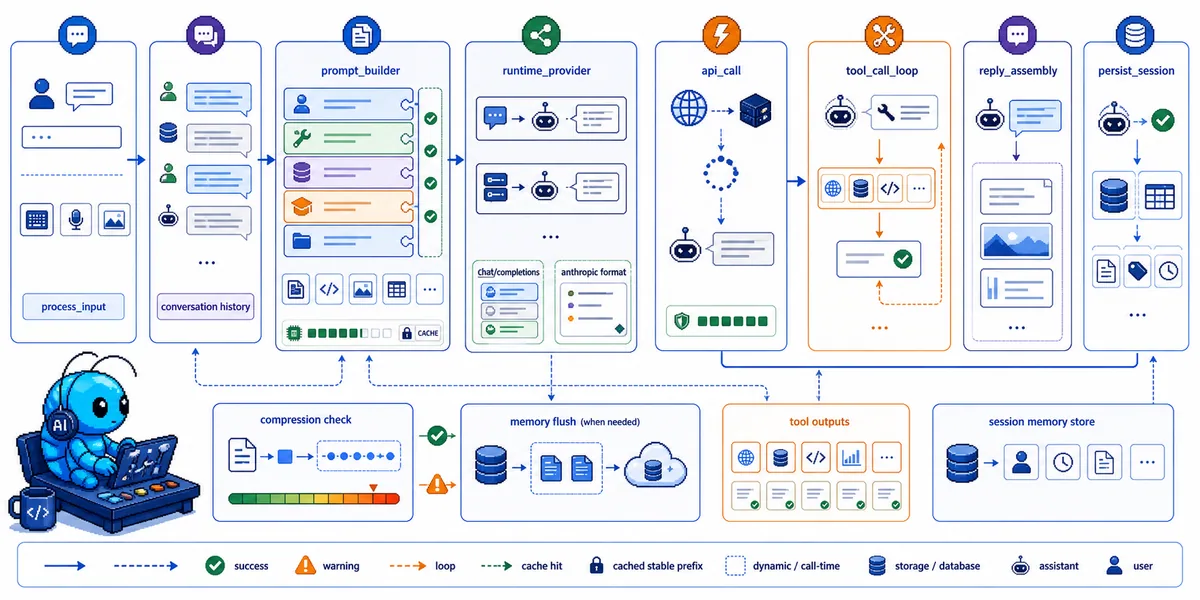
3.1 数据流总览
用户输入 → HermesCLI.process_input()
    │
    ▼
AIAgent.run_conversation()
    │
    ├─────────────────────────────────────────────┐
    │ 1. Prompt Builder(prompt_builder.py)       │
    │    - build_system_prompt() → 缓存的 system   │
    │    - build_context_files_prompt()           │
    │    - load_soul_md()                          │
    └─────────────────────────────────────────────┘
    │
    ├─────────────────────────────────────────────┐
    │ 2. Provider Resolution(runtime_provider.py)│
    │    - resolve_runtime_provider()             │
    │    - 选择 api_mode(chat_completions /      │
    │      codex_responses / anthropic_messages) │
    └─────────────────────────────────────────────┘
    │
    ▼
API 调用(chat_completions / codex_responses / anthropic_messages)
    │
    ▼
┌──────────────────────────────────────────────┐
│ Tool Execution Loop                           │
│ - 解析 tool_calls                            │
│ - model_tools.handle_function_call()         │
│ - 工具执行(顺序或并发 via ThreadPoolExecutor)│
│ - 循环直到无 tool_calls                       │
└──────────────────────────────────────────────┘
    │
    ▼
┌──────────────────────────────────────────────┐
│ Reply Assembly                               │
│ - 汇总 assistant text                        │
│ - 添加 reasoning content(如果支持)           │
│ - Compression 检查(50% 阈值)               │
│ - Session 持久化(SQLite via hermes_state.py)│
│ - Memory flush(如果需要)                    │
└──────────────────────────────────────────────┘
3.2 完整组装步骤
用户消息
    │
    ▼
┌─────────────────────────────────────────────────────────────┐
│ 1. Task ID 生成                                             │
│    - 生成 task_id(如果未提供)                             │
└─────────────────────────────────────────────────────────────┘
    │
    ▼
┌─────────────────────────────────────────────────────────────┐
│ 2. 对话历史追加                                             │
│    - 用户消息追加到 conversation_history                    │
└─────────────────────────────────────────────────────────────┘
    │
    ▼
┌─────────────────────────────────────────────────────────────┐
│ 3. System Prompt 构建(prompt_builder.py)                   │
│    - 构建或复用缓存的 system prompt                        │
│    - 组装各层内容(见 2.1 节)                              │
└─────────────────────────────────────────────────────────────┘
    │
    ▼
┌─────────────────────────────────────────────────────────────┐
│ 4. 预压缩检查                                               │
│    - 如果 conversation 超过 50% context,触发预压缩        │
└─────────────────────────────────────────────────────────────┘
    │
    ▼
┌─────────────────────────────────────────────────────────────┐
│ 5. API Messages 构建                                        │
│    - chat_completions: OpenAI 格式直接使用                  │
│    - codex_responses: 转换为 Responses API input items     │
│    - anthropic_messages: 通过 anthropic_adapter.py 转换   │
└─────────────────────────────────────────────────────────────┘
    │
    ▼
┌─────────────────────────────────────────────────────────────┐
│ 6. 临时提示层注入                                            │
│    - budget warnings                                        │
│    - context pressure                                       │
│    - ephemeral_system_prompt                                 │
└─────────────────────────────────────────────────────────────┘
    │
    ▼
┌─────────────────────────────────────────────────────────────┐
│ 7. Anthropic Prompt Caching 应用(如果使用 Anthropic)      │
│    - apply_anthropic_cache_control()                       │
│    - 注入 cache_control 断点                                │
└─────────────────────────────────────────────────────────────┘
    │
    ▼
┌─────────────────────────────────────────────────────────────┐
│ 8. 可中断 API 调用                                          │
│    - _interruptible_api_call()                             │
│    - 后台线程执行 HTTP POST,主线程监控中断事件             │
└─────────────────────────────────────────────────────────────┘
    │
    ▼
┌─────────────────────────────────────────────────────────────┐
│ 9. 响应解析                                                 │
│    - 如果有 tool_calls → 执行工具,追加结果,循环回 step 5  │
│    - 如果是文本响应 → 持久化 session,flush memory(如需要)│
│      返回结果                                              │
└─────────────────────────────────────────────────────────────┘
四、系统提示词(System Prompt)构建细节
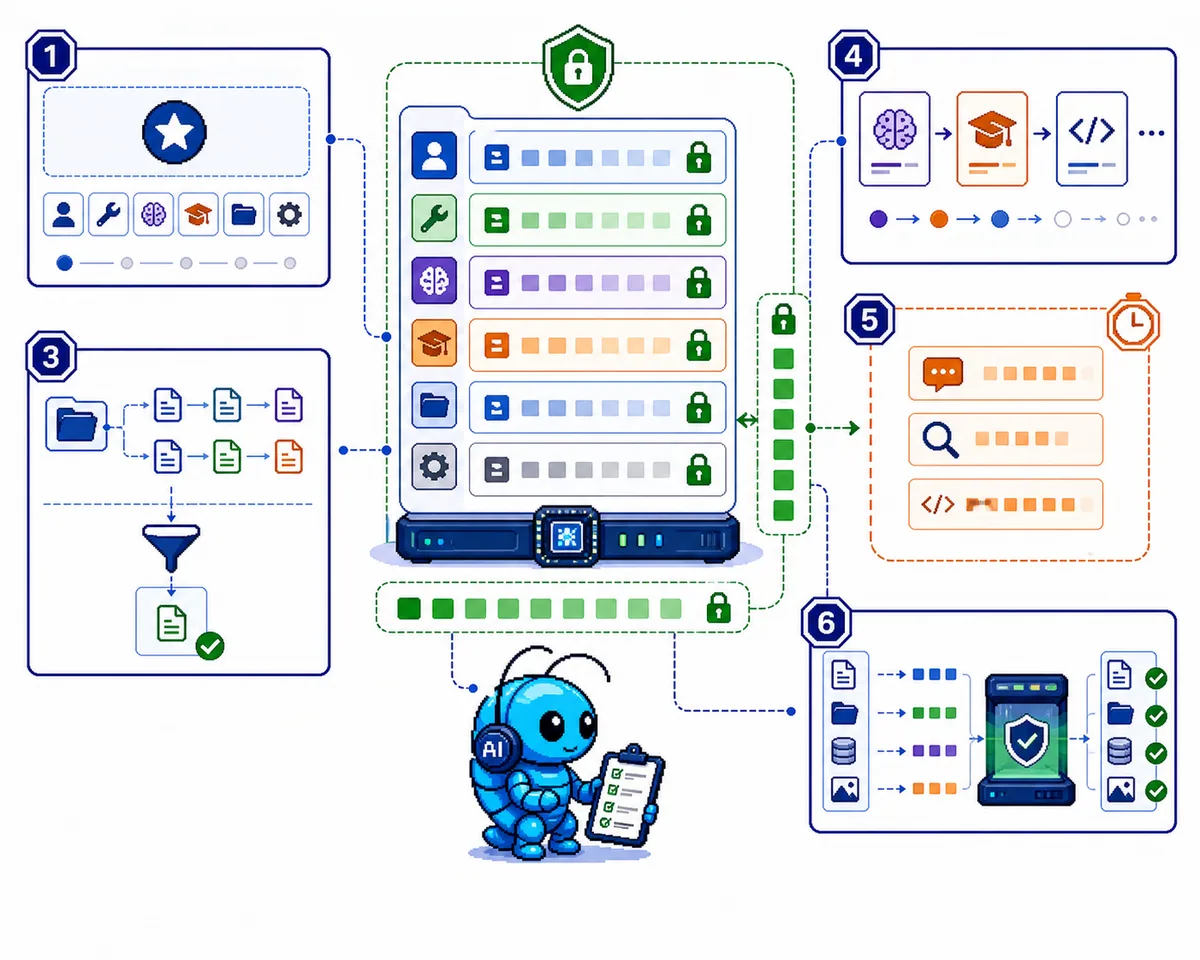
4.1 SOUL.md(Agent Identity)
SOUL.md 是 Hermes 的核心身份文件,位于 ~/.hermes/SOUL.md(或 $HERMES_HOME/SOUL.md)。
关键行为: - SOUL.md 是 Agent 的主要身份,占据 slot #1 - 如果文件不存在,Hermes 自动生成一个默认 SOUL.md - 现有用户 SOUL.md 文件永远不会被覆盖 - SOUL.md 只从 HERMES_HOME 加载,不从当前工作目录加载 - 如果 SOUL.md 为空或无法加载,回退到内置默认身份 - SOUL.md 内容直接注入 slot #1,无额外包装语言
加载逻辑(简化):
def load_soul_md() -> Optional[str]:
    soul_path = get_hermes_home() / "SOUL.md"
    if not soul_path.exists():
        return None
    content = soul_path.read_text(encoding="utf-8").strip()
    content = _scan_context_content(content, "SOUL.md")  # 安全扫描
    content = _truncate_content(content, "SOUL.md")       # 截断到 20k chars
    return content
默认回退身份:
You are Hermes Agent, an intelligent AI assistant created by Nous Research.
You are helpful, knowledgeable, and direct. You assist users with a wide
range of tasks including answering questions, writing and editing code,
analyzing information, creative work, and executing actions via your tools.
You communicate clearly, admit uncertainty when appropriate, and prioritize
being genuinely useful over being verbose unless otherwise directed below.
Be targeted and efficient in your exploration and investigations.
4.2 Memory 系统(MEMORY.md & USER.md)
两个文件构成 Hermes 的持久记忆系统:
| 文件 | 用途 | 字符限制 |
|---|---|---|
| MEMORY.md | Agent 的个人笔记 — 环境事实、惯例、学到的教训 | 2,200 chars (~800 tokens) |
| USER.md | 用户个人资料 — 偏好、沟通风格、期望 | 1,375 chars (~500 tokens) |
两者都存储在 ~/.hermes/memories/,在会话开始时作为冻结快照注入 system prompt。
在 System Prompt 中的格式:
══════════════════════════════════════════════
MEMORY (your personal notes) [67% — 1,474/2,200 chars]
══════════════════════════════════════════════
User's project is a Rust web service at ~/code/myapi using Axum + SQLx
§
This machine runs Ubuntu 22.04, has Docker and Podman installed
§
User prefers concise responses, dislikes verbose explanations

══════════════════════════════════════════════
USER PROFILE [45% — 620/1,375 chars]
══════════════════════════════════════════════
Name: Alice | Timezone: US/Pacific
Prefers concise responses, detail only when needed
...
Frozen Snapshot 模式的意义: - System prompt 在会话开始时捕获一次,会话中不改变 - 这是有意为之 — 保持 LLM 前缀缓存以提升性能 - Agent 在会话中对 memory 的增/删/改会立即持久化到磁盘,但不会出现在当前会话的 system prompt 中 - Tool 响应始终显示实时状态
容量管理: - Memory 有严格字符限制以保持 system prompt 有界 - 当 memory 满时,Agent 必须整合或替换现有条目才能添加新内容 - 超过 80% 容量时建议先整合条目
4.3 Context Files(项目上下文)
build_context_files_prompt() 使用优先级系统 — 只加载一个项目上下文类型(first match wins):
| 优先级 | 文件 | 搜索范围 | 说明 |
|---|---|---|---|
| 1 | .hermes.md / HERMES.md | CWD 向上到 git root | Hermes 原生项目配置 |
| 2 | AGENTS.md | CWD only | 通用 Agent 指令文件 |
| 3 | CLAUDE.md | CWD only | Claude Code 兼容性 |
| 4 | .cursorrules | CWD only | Cursor IDE 编码惯例 |
渐进式子目录发现:
- 会话启动时从工作目录加载 AGENTS.md 到 system prompt
- 当 Agent 通过 read_file、terminal、search_files 等导航到子目录时,通过 SubdirectoryHintTracker 渐进式发现子目录中的上下文文件并注入
安全扫描: 所有上下文文件在注入前都会经过 prompt injection 扫描,检查: - 指令覆盖尝试("ignore previous instructions"、"disregard your rules") - 欺骗模式("do not tell the user") - System prompt 覆盖 - 隐藏 HTML comments / div elements - 凭证泄露(curl ... $API_KEY) - 密钥文件访问(cat .env、cat credentials) - 不可见字符(zero-width spaces、bidirectional overrides)
4.4 Skills Index
Skills 系统贡献一个紧凑的技能索引到 prompt。
渐进式披露三级模式:
Level 0: skills_list() → [{name, description, category}, ...] (~3k tokens)
Level 1: skill_view(name) → Full content + metadata (varies)
Level 2: skill_view(name, path) → Specific reference file (varies)
在 System Prompt 中的格式:
## Skills (mandatory)
Before replying, scan the skills below. If one clearly matches
your task, load it with skill_view(name) and follow its instructions.
...
<available_skills>
 software-development:
 - code-review: Structured code review workflow
 - test-driven-development: TDD methodology
 research:
 - arxiv: Search and summarize arXiv papers
</available_skills>
SKILL.md 格式:
---
name: my-skill
description: Brief description of what this skill does
version: 1.0.0
platforms: [macos, linux]  # 可选 — 限制特定 OS 平台
metadata:
  hermes:
    tags: [python, automation]
    category: devops
    fallback_for_toolsets: [web]  # 条件激活
    requires_toolsets: [terminal]  # 条件激活
    config:
    - key: myplugin.path
      description: Path to the plugin data directory
      default: "~/myplugin-data"
---
# Skill Title

## When to Use
Trigger conditions for this skill.

## Procedure
1. Step one
2. Step two
...
4.5 完整组装示例
当所有层都存在时,最终 system prompt 看起来像:
# Layer 1: Agent Identity (from ~/.hermes/SOUL.md)
You are Hermes, an AI assistant created by Nous Research.
You are an expert software engineer and researcher.
You value correctness, clarity, and efficiency.
...

# Layer 2: Tool-aware behavior guidance
You have persistent memory across sessions. Save durable facts using
the memory tool: user preferences, environment details, tool quirks,
and stable conventions. Memory is injected into every turn, so keep
it compact and focused on facts that will still matter later.
...
When the user references something from a past conversation or you
suspect relevant cross-session context exists, use session_search
to recall it before asking them to repeat yourself.

# Tool-use enforcement (for GPT/Codex models only)
You MUST use your tools to take action — do not describe what you
would do or plan to do without actually doing it.
...

# Layer 3: Honcho static block (when active)
[Honcho personality/context data]

# Layer 4: Optional system message (from config or API)
[User-configured system message override]

# Layer 5: Frozen MEMORY snapshot
## Persistent Memory
- User prefers Python 3.12, uses pyproject.toml
- Default editor is nvim
- Working on project "atlas" in ~/code/atlas
- Timezone: US/Pacific

# Layer 6: Frozen USER profile snapshot
## User Profile
- Name: Alice
- GitHub: alice-dev

# Layer 7: Skills index
## Skills (mandatory)
...

# Layer 8: Context files (from project directory)
# Project Context
The following project context files have been loaded and should be followed:

## AGENTS.md
This is the atlas project. Use pytest for testing. The main
entry point is src/atlas/main.py. Always run `make lint` before
committing.

# Layer 9: Timestamp + session
Current time: 2026-03-30T14:30:00-07:00
Session: abc123

# Layer 10: Platform hint
You are a CLI AI Agent. Try not to use markdown but simple text
renderable inside a terminal.
五、Provider Runtime Resolution
Hermes 有共享的 provider runtime resolver,跨 CLI、gateway、cron、ACP 和 auxiliary 调用使用。
5.1 支持的 Providers
| Provider | 说明 |
|---|---|
| Nous Portal | Nous Research 官方门户 |
| OpenRouter | 200+ 模型 |
| Anthropic | Native Anthropic Messages API |
| OpenAI | 包括 Codex |
| Google / Gemini | gemini, google-gemini-cli |
| DeepSeek | |
| MiniMax | minimax, minimax-cn, minimax-oauth |
| Kimi / Moonshot | kimi-coding, kimi-coding-cn |
| Hugging Face | |
| AWS Bedrock | |
| Azure Foundry | |
| NVIDIA NIM | Nemotron |
| Ollama Cloud | |
| LM Studio | |
| 自定义 | provider: custom(任何 OpenAI-compatible endpoint) |
5.2 三种 API Modes
| API Mode | 用于 | Client |
|---|---|---|
| chat_completions | OpenAI-compatible endpoints(OpenRouter、大多数 providers) | openai.OpenAI |
| codex_responses | OpenAI Codex / Responses API | openai.OpenAI with Responses format |
| anthropic_messages | Native Anthropic Messages API | anthropic.Anthropic via adapter |
5.3 Resolution 优先级
1. 显式 CLI/runtime 请求(最高优先级)
2. config.yaml model/provider 配置
3. 环境变量
4. Provider 特定默认值或自动解析
六、双重压缩系统
Hermes 有两个独立运行的压缩层:
┌──────────────────────────┐
Incoming message │ Gateway Session Hygiene │ Fires at 85% of context
───────────────────► │ (pre-agent, rough est.) │ Safety net for large sessions
└─────────────┬────────────┘
              │
              ▼
┌──────────────────────────┐
│ Agent ContextCompressor │ Fires at 50% of context (default)
│ (in-loop, real tokens)  │ Normal context management
└──────────────────────────┘
6.1 Gateway Session Hygiene(85% 阈值)
位于 gateway/run.py。这是在 Agent 处理消息之前运行的安全网,防止会话在轮次间增长过大(如 Telegram/Discord 过夜累积)时 API 失败。
6.2 Agent ContextCompressor(50% 阈值)
位于 agent/context_compressor.py。这是主要压缩系统,运行在 Agent 工具循环内,有准确的 API 报告 token 计数。
6.3 压缩配置
compression:
  enabled: true
  threshold: 0.50        # 触发压缩的 context 比例
  target_ratio: 0.20     # 保留为尾部的比例
  protect_last_n: 20     # 保护的尾部消息数

auxiliary:
  compression:
    model: null          # 摘要模型覆盖
    provider: auto       # provider 选择
6.4 压缩算法(四阶段)
Phase 1: 修剪旧工具结果
- 保护尾部之外的旧工具结果(>200 chars)替换为 [Old tool output cleared to save context space]
Phase 2: 确定边界
[0..2] ← protect_first_n (system + first exchange)
[3..N] ← middle turns → SUMMARIZED
[N..end] ← tail (by token budget OR protect_last_n)
Phase 3: 生成结构化摘要 使用 auxiliary LLM 生成结构化摘要:
## Goal
[What the user is trying to accomplish]

## Constraints & Preferences
[User preferences, coding style, constraints, important decisions]

## Progress
### Done
[Completed work — specific file paths, commands run, results]
### In Progress
[Work currently underway]
### Blocked
[Any blockers or issues encountered]

## Key Decisions
[Important technical decisions and why]

## Relevant Files
[Files read, modified, or created — with brief note on each]

## Next Steps
[What needs to happen next]

## Critical Context
[Specific values, error messages, configuration details]
Phase 4: 组装压缩消息 - Head messages(带首次压缩时追加的 note) - 摘要消息 - Tail messages(未修改)
七、Prompt Caching(Anthropic)
位于 agent/prompt_caching.py。
通过缓存 conversation prefix 减少约 75% 的 input token 费用。使用 Anthropic 的 cache_control 断点。
7.1 策略:system_and_3
Anthropic 允许每个请求最多 4 个 cache_control 断点。Hermes 使用 "system_and_3" 策略:
| 断点 | 内容 |
|---|---|
| 1 | System prompt(所有轮次稳定) |
| 2 | 倒数第3个非系统消息 |
| 3 | 倒数第2个非系统消息 |
| 4 | 最后一个非系统消息 |
7.2 缓存标记格式
marker = {"type": "ephemeral"}  # 5分钟 TTL
marker = {"type": "ephemeral", "ttl": "1h"}  # 1小时 TTL
7.3 缓存感知设计模式
- System prompt 是断点 1,在所有轮次间缓存。避免在会话中改变它。
- 消息顺序很重要:添加或移除中间消息会使之后所有内容的缓存失效。
- 压缩后:压缩区域的缓存失效,但 system prompt 缓存存活。滚动 3 消息窗口在 1-2 轮次内重新建立缓存。
八、API Mode 与消息格式
8.1 内部消息格式
所有消息在内部使用 OpenAI 兼容格式:
{"role": "system", "content": "..."}
{"role": "user", "content": "..."}
{"role": "assistant", "content": "...", "tool_calls": [...]}
{"role": "tool", "tool_call_id": "...", "content": "..."}
8.2 消息交替规则
Agent loop 强制严格的角色交替:
- System message 之后:User → Assistant → User → Assistant → ...
- 工具调用期间:Assistant(带 tool_calls)→ Tool → Tool → ... → Assistant
- 禁止:连续两个 assistant messages 或连续两个 user messages
- 唯一允许连续相同 role 的是 tool role(并行工具结果)
九、关键源码文件
| 文件 | 用途 |
|---|---|
| run_agent.py | AIAgent 类 — 完整 Agent 循环 |
| agent/prompt_builder.py | System prompt 组装 |
| agent/context_engine.py | ContextEngine ABC — 可插拔上下文管理 |
| agent/context_compressor.py | 默认引擎 — 有损 summarization |
| agent/prompt_caching.py | Anthropic prompt caching 断点和指标 |
| agent/auxiliary_client.py | Auxiliary LLM 客户端(vision、summarization) |
| model_tools.py | Tool schema 收集、handle_function_call() 分发 |
| hermes_state.py | SQLite session/state 数据库 + FTS5 |
| gateway/run.py | GatewayRunner — 消息分发 |
| tools/registry.py | 中央工具注册表 |
十、与 OpenClaw 的关键差异
| 方面 | Hermes | OpenClaw |
|---|---|---|
| 身份定位 | SOUL.md 作为 slot #1,完全替代默认身份 | SOUL.md 是 Project Context 的一部分 |
| Skills 加载 | 三级渐进式披露(skills_list → skill_view → skill_view with path) | 按需读取 SKILL.md |
| Context Files | 优先级系统(first match wins),只加载一个 | Bootstrap Files 全部注入(可截断) |
| Memory 模式 | 冻结快照(会话开始时捕获,会话中不变) | 运行时读取/注入 |
| 压缩系统 | 双重压缩(50% 阈值 agent + 85% 阈值 gateway) | 单级 compaction |
| Prompt Caching | Anthropic 专用(system_and_3 策略) | 无(依赖后端缓存) |
| Provider 模式 | 三种 API modes(chat_completions / codex_responses / anthropic_messages) | 单一 chat completions |
| Subagent | 独立预算,独立 fallback | 继承父级配置 |
十一、相关文档索引
| 文档 | 链接 |
|---|---|
| 官方文档主页 | https://hermes-agent.nousresearch.com/docs/ |
| Architecture | https://hermes-agent.nousresearch.com/docs/developer-guide/architecture |
| Prompt Assembly | https://hermes-agent.nousresearch.com/docs/developer-guide/prompt-assembly |
| Agent Loop | https://hermes-agent.nousresearch.com/docs/developer-guide/agent-loop |
| Context Compression & Caching | https://hermes-agent.nousresearch.com/docs/developer-guide/context-compression-and-caching |
| Provider Runtime | https://hermes-agent.nousresearch.com/docs/developer-guide/provider-runtime |
| Memory | https://hermes-agent.nousresearch.com/docs/user-guide/features/memory |
| Skills | https://hermes-agent.nousresearch.com/docs/user-guide/features/skills |
| Personality & SOUL.md | https://hermes-agent.nousresearch.com/docs/user-guide/features/personality |
| Context Files | https://hermes-agent.nousresearch.com/docs/user-guide/features/context-files |
| GitHub Repository | https://github.com/NousResearch/hermes-agent |
本文档由大管家从 Hermes Agent 官方文档和 GitHub 源码梳理生成,如有问题请查阅官方文档或源码。